Is “Free iCloud Unlock” Actually Real? My Honest Guide for 2026
Let’s be real for a second. We have all been there. You buy a used iPhone off eBay, or maybe you dig your old iPad out of a drawer for your kid, and you get hit with that white screen: Activation Lock.
It is the absolute worst feeling. You are holding a perfectly good piece of technology that is basically a brick because you don’t know the original email or password.
Naturally, you hit Google. You search for “Free iCloud Unlock,” or maybe “iCloud Unlock Online Free” and you are instantly bombarded with flashy websites promising to unlock your phone in 30 seconds if you just pay them a few bucks.
I’m going to save you some time: 99% of those are fake.
But don’t panic. I’ve been messing around with iOS devices for years, and while there is no “magic button,” there are actual, legitimate ways to get back into your device without spending a dime. It just takes a bit of work.
Here is what actually works, explained simply.
First: The “Am I Wasting My Time?” Check
Before you try anything, you need to know if the phone is even worth saving. You need to find the IMEI number. It’s usually printed on the SIM tray or, if the phone is on the “Hello” screen, you can tap the little “i” icon in the corner.
Go to any free IMEI checker online and look for one thing: Find My iPhone status.
If it says “Clean”: You have a chance. Keep reading.
If it says “Lost” or “Stolen”: Stop. Seriously, just stop. Apple won’t help you, and no software tool will touch it. It’s a paperweight. If you bought it, try to get your money back.
Option 1: The “Ask Nicely” Method (Remote Unlock)
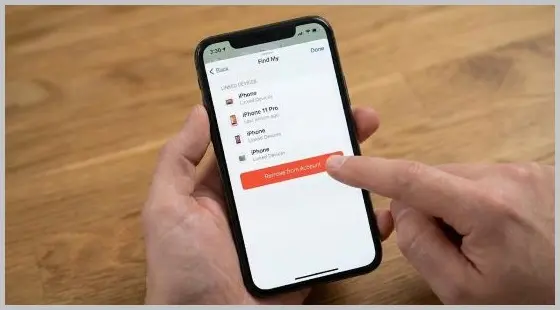
The “Remove from Account” button in the Find My app is the key to unlocking a device remotely without a password.
This sounds too simple to work, but it’s the most successful method I’ve used.
If you bought the phone from a real person (like on Facebook Marketplace or eBay), they probably didn’t scam you on purpose. They just forgot to log out.
You don’t need their password. Just message them and say: “Hey, the phone is still linked to your account. Can you log into iCloud.com, go to Find My, and click ‘Remove from Account’?”
Send them a screenshot of where the button is. Once they click that, you just restart the phone, and the lock is gone. It takes them two minutes.
Option 2: The “Official” Route (If you have the receipt)
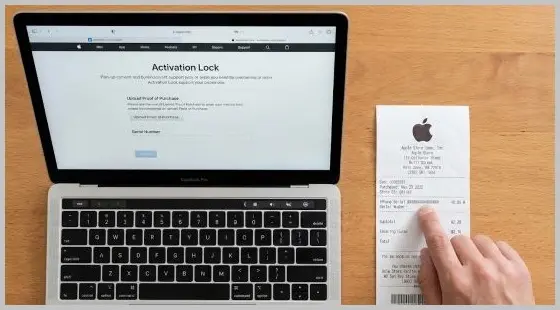
If you are the original owner, or if the seller gave you the original receipt, you are golden.
Apple has a specific portal for this. It’s not the main support page; it’s a dedicated form for removing Activation Lock. You upload a photo of the receipt showing the serial number and the purchase date.
If the paperwork looks real, Apple will unlock it remotely. They don’t charge for this as it’s totally free. I’ve done this for an old iPad I forgot the ID for, and it took about three days for them to email me back saying “Done.”
Option 3: The DNS Trick (The Band-Aid Fix)

Okay, let’s say you don’t have the receipt and you can’t reach the seller. You still want to use the phone for something, right?
There is an old-school trick called a DNS Bypass. It doesn’t fully unlock the phone as you won’t be able to make calls or download apps but it lets you browse the web, watch YouTube, and play some games.
Here is how you do it:
- Factory reset the phone so you are at the “Choose Wi-Fi” screen.
- Don’t click your network yet. Tap the little “i” or “More Settings” next to it.
- Look for “DNS” and switch it from Automatic to Manual.
- Delete what’s there and type in these IP address based on your region:
USA: 104.154.51.7
Europe: 104.155.28.90
Asia: 104.155.220.58 - Now connect to the Wi-Fi.
When the phone tries to activate, hit the “Back” button at the top. If you timed it right, you’ll be dumped into a menu screen called “iCloudDNSBypass.” It’s crude, but hey, it turns a brick into a web browser.
Option 4: The Techy Way (For Older Phones Only)
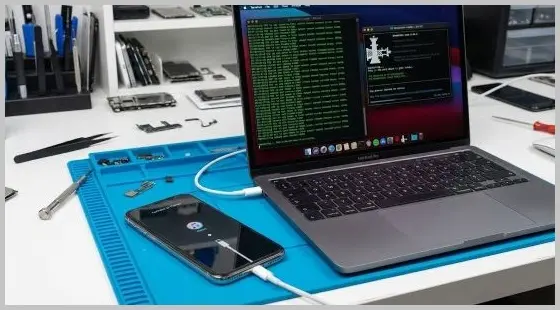
If you have an iPhone X or anything older (like an iPhone 7 or 8), you are in a unique spot. These phones have a hardware flaw called Checkm8 that Apple can’t fix.
Developers have built tools that use this flaw to force the phone to skip the Activation Lock screen. This is often called a “Jailbreak bypass.”
The catch?
- Most free versions of these tools will break your cellular signal (so no calls).
- It requires a computer (usually a Mac) to run the software.
- It’s technical. You’ll be looking at code screens.
If you are feeling brave, look up “Checkra1n” or “Palera1n” to see the latest tutorials. Just be careful – never pay for a tool unless you have seen video proof from a real person that it works.
Troubleshooting: “Why isn’t it working?”
- “The DNS thing keeps failing.” It can be finicky. Sometimes your internet is too fast or too slow. Forget the network, restart the router, and try typing the numbers again. Make sure there are no spaces.
- “The seller said they removed it, but I’m still stuck.” The phone needs to check in with Apple. Force restart the phone. If it’s still locked, the seller might have clicked “Erase Device” (which keeps the lock on) instead of “Remove from Account.” They have to do the removal step.
- Tool asks for Credit Card / Money: It is a scam. Close the site immediately. Legitimate software has trials or clear pricing; credit cards, fees are red flags.
So, what’s the verdict?
I know it’s frustrating. We all want that one website where we type in our IMEI and poof, the problem is gone. But Apple security is world-class for a reason.
If anyone tells you they can unlock a modern iPhone (like an iPhone 16 or 17) remotely for a few bucks without a receipt, they are lying to you. Stick to the official methods or the DNS workaround, and keep your wallet closed.
Frequently Asked Questions (FAQ)
Q: Are “IMEI Unlock” services on eBay legit?
A: Most are not. Some claim to have “insiders” at Apple, but these are risky, expensive, and often fail (or the unlock gets revoked later). Proceed with extreme caution.
Q: Does “Jailbreaking” remove iCloud Lock?
A: No. Jailbreaking opens the file system, but the Activation Lock is server-side (on Apple’s computers). You can use a jailbreak to run a bypass tool, but the jailbreak itself does not unlock the phone.
Q: What is the difference between Bypass and Unlock?
- Unlock: Permanent. You can update iOS, reset the phone, and use a SIM card.
- Bypass: Temporary/Partial. You often cannot update iOS, cannot reset the phone, and usually cannot use cellular calls.
Glossary of Terms
- Activation Lock: A security feature linked to “Find My” that prevents a device from being reactivated without the original password.
- Checkm8: A permanent hardware vulnerability in iPhone chips A5 through A11 (iPhone 4S to iPhone X) that allows for deep system access.
- IMEI: International Mobile Equipment Identity. A unique 15-digit fingerprint for your phone.
- Setup.app: The specific program on the iPhone that runs the “Hello” screen and checks for Activation Lock. Deleting or skipping this is how “bypasses” work.
- Tethered: Refers to a modification that requires a computer connection to boot the phone if it gets turned off.